Can ChatGPT Sites Replace a Web Designer?
ChatGPT Sites built Roadnote, a working voice-note app, from one sentence in about 30 minutes. That is impressive for a new technology. It produced a useful prototype, not a full business website with navigation, supporting pages, policies, search strategy, testing, and ownership worked out.
The Code Was the Fast Part
Sites can replace a large amount of mechanical web work. For Roadnote, it planned the interface, wrote a responsive application, generated the sharing art, built the project, and published it. That is a real result from one sentence.
The remaining questions are the ones a business gets blamed for later. Roadnote has no real navigation, Privacy Policy, Terms of Service, support pages, search plan, or answer about what happens after the qualifying Sites plan ends. A polished screen is not the same product as a complete website.
What Did ChatGPT Sites Build in 30 Minutes?
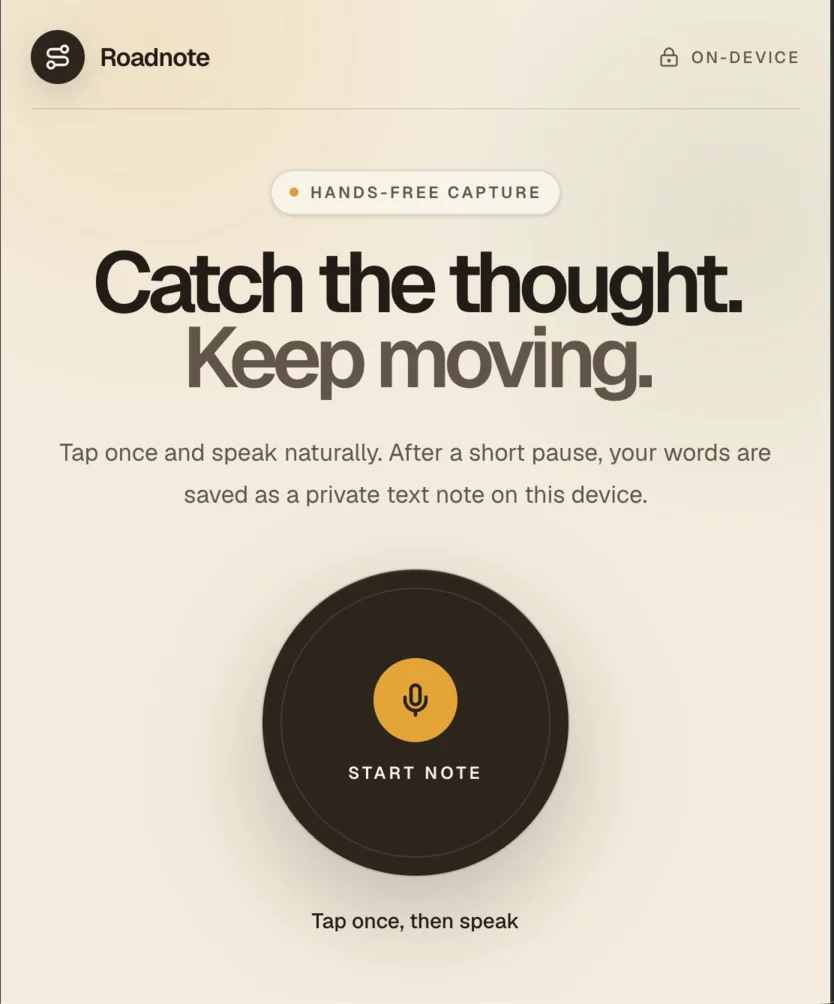
ChatGPT Sites built a responsive voice-note web app from one sentence in about 30 minutes. Roadnote records speech, shows an interim transcript, waits for a pause, saves the text in the browser, and lets the user copy or delete each note.
My entire prompt was: “@Sites Create a website that let's me take voice notes on my mobile while driving and saves them as text.” No wireframe. No feature list. I did not name a color, framework, storage method, or browser API.
The first useful surprise was scope. Sites did not hand back a mockup pretending to be an app. The microphone control works. Notes survive a browser restart. There is an empty state, a live transcript, copy and delete controls, microphone error messages, and a warning to mount the phone before driving.
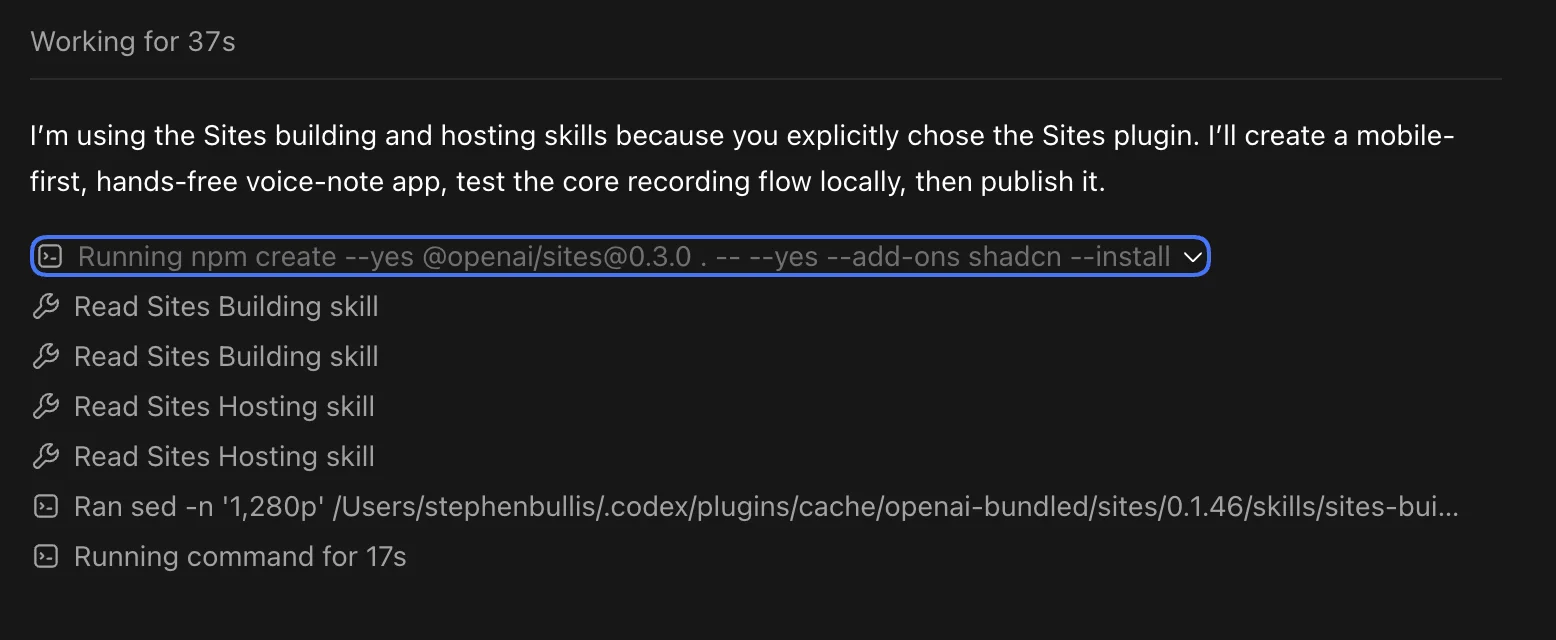
What Sites handled
- • Created the project and installed its dependencies
- • Designed the mobile interface and recording flow
- • Wrote speech capture, transcript, copy, and delete behavior
- • Added metadata and a custom sharing image
- • Built and published a working production URL
What still needed a person
- • Match the privacy promise to the browser API
- • Test the phones and browsers people use
- • Choose a search query and business goal
- • Add navigation, supporting pages, privacy, and terms
- • Own the claims and the launch decision
How Does ChatGPT Sites Work Behind the Scenes?
Sites turns the request into a local web project, builds a deployable version, then publishes that saved version through OpenAI-managed hosting. OpenAI treats saving and deploying as separate stages, so a version can be reviewed before it becomes the production site.
Roadnote began with OpenAI's Sites starter and shadcn. Codex then changed the source, ran the app, built it, and passed the output to Sites hosting.
Roadnote arrives from Cloudflare with Next-style /_next/ assets, React Server Component data, and Vinext markers. Calling it a Next.js app is fair. Production behaves like a Cloudflare Worker.
Sites can also add D1 records, R2 files, identity, Sign in with ChatGPT, secrets, access controls, analytics, and custom domains. Roadnote needed none of them.
What Is Roadnote Actually Doing in the Browser?
Roadnote saves the finished text as JSON in the browser's localStorage under the key roadnote-voice-notes. That storage survives ordinary browser restarts, stays tied to the site's origin, and disappears if the user clears that browser data.
Recording uses SpeechRecognition or webkitSpeechRecognition. It is fixed to U.S. English, with continuous mode and interim results on.
Each result restarts a 2.8-second timer. Silence stops listening, cleans the text, adds an ID and timestamp, then puts the newest note first. Copy uses the Clipboard API. Delete rewrites localStorage without that record.
~30 min
From one sentence to a working deployment with interface, logic, metadata, art, and hosting.
2.8 sec
The silence timer in the deployed code. A quiet 2.8 seconds stops recognition and saves.
91 words
Visible copy on the page. Enough for the action and warning, not for search intent or proof.
0 images
Image elements in the body. The 1536×1024 social card exists only in metadata.
There is no account, database, or note API. I found no app request that uploads the transcript. Notes stay on one browser, with no sync or recovery after its data is cleared.
Where Did the First Draft Shine and Slip?
The first draft is unusually complete for a thirty-minute build. Its strongest work sits in product flow and presentation. The weak spots appear where a polished interface makes a promise about technology that still depends on the visitor's browser.
What Sites Got Right
The first screen makes sense
Roadnote opens on a large recording control, visible history, and a nearby safety warning.
The empty state teaches
The empty state includes a sample sentence that teaches what the app expects.
The interface accounts for failure
Permission denial, missing support, silence, recording, transcription, and saving have distinct messages.
Sharing was not forgotten
Open Graph and X tags include titles, descriptions, dimensions, alt text, and Roadnote-specific art.
What a Human Review Caught
Hands-free still starts with a tap
There is no wake word or automatic capture. The page tells drivers to set up before moving.
On-device needs a narrower claim
Text stays in localStorage. Without processLocally, a browser may send audio to its recognition service.
Browser support is uneven
MDN marks SpeechRecognition limited availability. Disabling the control handles that gap without fixing it.
The polish is more specific than the brand
The social card has an idea. The pill, huge headline, rounded panel, and icon blocks still resemble many AI sites.
The privacy wording deserves the most attention. “Notes stay in this browser” is supported by the code. The “On-device” label is broader. MDN says browser speech recognition may use a server-based engine unless the code requests local processing with processLocally. Roadnote never sets that property.
So the stored note is local. The audio processing may not be. That single missing line does not make Roadnote a bad prototype. It shows why finished-looking software still needs somebody to compare the claim with the implementation.
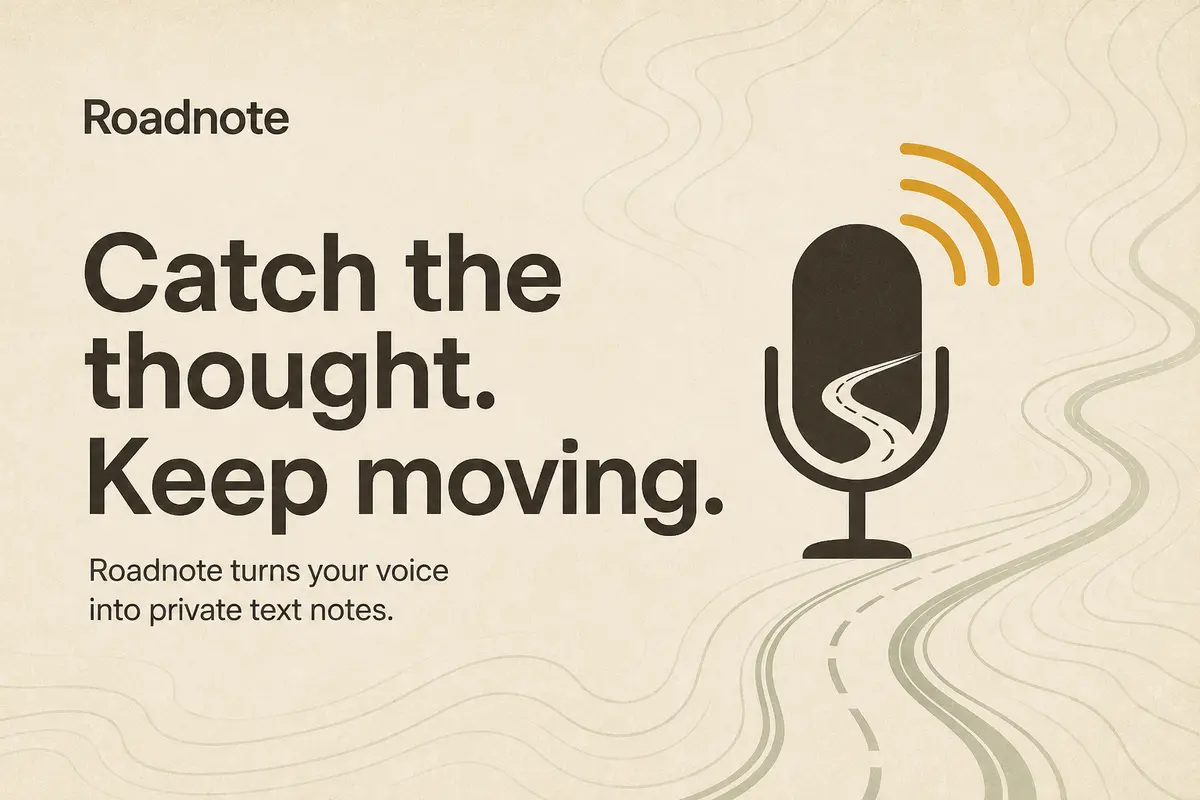
The social image is clever. It turns the microphone into a road. The 1536×1024 file has declared dimensions and useful Open Graph alt text.
Open the page and that artwork disappears. I counted zero body images, leaving no screenshot, setting, or visual proof.
Pretty Is Not the Same as Recognizable
The social image is the standout
The microphone becomes a road, the headline fits, and the metadata includes dimensions and alt text.
The actual page has no images
No screenshots, context photos, illustrations, or image elements appear after someone opens the link.
The layout speaks fluent AI
Geist type, a capsule label, huge copy, cream surfaces, rounded cards, and tidy icons look polished, not ownable.
There is no evidence layer
A business site needs real work, people, place, results, reviews, or a process somebody can inspect.
Change the name and color and the same capsule label, huge headline, pale background, rounded panel, and icon blocks could sell several apps. Nothing looks broken or uniquely Roadnote.
A business cannot stop there. Plumbers need completed work. Therapists need credible privacy and place. Restaurants need food and atmosphere. Polish cannot substitute for evidence.
Is Roadnote Accessible Enough to Ship?
Roadnote gets several accessibility basics right, including landmarks, a real button, a clear focus ring, an accessible name, an aria-pressed state, and a polite live region. It still needs zoom-friendly viewport settings, a typed-note alternative, broader browser support, and assistive-technology testing before I would call it ready.
At a 375-pixel viewport, the main control measured about 195 by 195 pixels. There was no horizontal overflow. Heading order, hidden decorative icons, and reduced-motion handling were sound.
Accessibility work Sites got right
- • Main, header, aside, and footer landmarks
- • One H1 followed by one H2
- • A named button with aria-pressed
- • A polite live region for status messages
- • Hidden decorative icons, visible focus, and reduced motion
Accessibility work still missing
- • maximum-scale=1 restricts zoom
- • An 88 by 15 pixel footer link in my mobile test
- • No typed fallback when speech is unavailable
- • A core API with limited browser availability
- • No assistive-tech test results or support list
Speech is the only input. An unsupported browser, speech disability, or noisy setting makes the feature unusable. A text box would create a practical fallback.
The viewport includes maximum-scale=1. W3C guidance says authors should not block text enlargement to 200 percent. A browser might ignore it. The code should still leave zoom alone.
The footer link measured about 88 by 15 pixels. WCAG exceptions may apply because it is isolated and inline. It is still unnecessarily hard to tap.
Is Roadnote a Full Business Website?
No. Roadnote is a working one-screen prototype, not a full business website or finished product. It has no navigation, supporting pages, Privacy Policy, Terms of Service, support route, visible company identity, or legal owner. It also needs correction, export, recovery, installability, security review, measurement, and edge cases.
To be fair, my one-sentence prompt did not ask for a full company website or a legal section. Sites met the narrow brief. The danger is that a narrow result can look finished enough to hide the scope nobody requested.
The missing Privacy Policy is more than a footer detail. Roadnote requests microphone access, relies on browser speech recognition that may use a remote service, writes notes into localStorage, and receives a Cloudflare bot cookie. A policy should explain each fact in language a driver can understand.
Terms should cover availability, acceptable use, the limits of speech recognition, responsibility for saved notes, and the obvious warning against handling a phone while driving. Navigation should connect those policies to how-it-works, browser support, help, and contact pages.
That does not cancel the achievement. “It works” and “it is ready for customers” are different sentences.
Roadnote's response set Cloudflare's __cf_bm bot cookie. Cloudflare says it is separate from the app and not tied to an app user ID. A broad “no cloud” impression still misses that network behavior.
The response lacked the security headers in the list above. CSP restricts resource loading. HSTS keeps future requests on HTTPS. Permissions Policy makes microphone access explicit. Missing them does not prove an exploit. It shows that hardening was not finished.
OpenAI ties Sites to local source and a Git commit, better than a sealed builder. Moving a product still means moving hosting, identity, data, secrets, analytics, DNS, and browser notes.
How Is This Different From Traditional Web Development?
Traditional development decides more before the polished screen. A business project starts with the owner, offer, customer, page structure, proof, search language, domain, policies, and handoff. Sites reversed that order. It produced an answer first, making the unanswered business questions easier to see.
Roadnote does one small job well. It does not explain who operates it, which browsers it supports, how to get help, what happens to speech data, what terms apply, or where the user should go next. Calling it a full website makes the word “website” carry too much weight.
The header contains a logo and an “On-device” badge, not navigation. The footer contains one storage sentence, not a path to Privacy, Terms, support, or contact information. There are no supporting routes at all.
Internet Crafters builds customer-facing small business websites, not custom software toys. The job is to make a real company understandable and credible, then give a customer an obvious next step. AI helps us cut repetitive production work. It does not get the final vote on claims, page structure, images, accessibility, or launch.
The AI-generated Roadnote draft
- • One screen built around one interaction
- • A header with no navigation or page hierarchy
- • No Privacy Policy, terms, help, or contact page
- • No in-page photography or business proof
- • SEO metadata without a broader search plan
- • Hosting governed by a beta platform and qualifying plan
An Internet Crafters business website
- • Five to seven pages planned around the customer
- • Navigation connecting services, proof, and contact paths
- • Mobile design and basic SEO across the site
- • Up to 30 licensed stock photos or five HD videos
- • Two revision rounds and a 30-day money-back guarantee
- • Code, domain, and hosting account the client controls
Our $550 build is a five-to-seven-page business website, delivered in about three weeks. It includes mobile design, basic SEO, licensed visuals, two revision rounds, and a 30-day money-back guarantee. See the full website package and our finished examples.
The client owns the code, registers the domain in their own name, and controls the hosting account. If Internet Crafters disappears, another developer can take over. That boring handoff detail matters more than an AI builder's first-screen sparkle.
Can a ChatGPT Site Rank on Google?
A ChatGPT Site can be indexed because the platform can return readable HTML with normal titles, headings, and descriptions. Ranking still depends on useful content, links, authority, technical cleanup, and whether the site answers a searcher's question better than the pages already competing for it.
Roadnote starts better than many JavaScript demos. Its headline and supporting copy appear in the first HTML response. Google recommends server-side rendering or pre-rendering because crawlers and visitors get useful content without waiting for JavaScript to assemble it.
SEO assets Roadnote already has
- • Readable HTML returned with a 200 response
- • A unique title, description, language tag, and H1
- • Open Graph and X tags with relevant art
- • A responsive Cloudflare-served layout
- • A custom domain option when the Sites account makes it available
SEO work Roadnote does not have
- • No canonical tag in the deployed home page
- • robots.txt and sitemap.xml return 404
- • No structured data describing the app or its publisher
- • Only 91 visible words for possible searches
- • No visible image for image search or explanation
- • No navigation, supporting pages, proof, or earned links
A one-page site can be indexed without a sitemap, and Google can choose a canonical. Both matter more after adding routes, a custom domain, or duplicate addresses.
Purpose is the bigger problem. “Roadnote” has no search history. The page does not answer questions about voice notes, driving safety, browser support, or privacy. There is little to link to and nowhere to crawl next.
Ninety-one words can explain one button. Search needs compatibility, privacy, driving safety, dictation comparisons, and support answers based on real problems. Each page needs a reason beyond repeating a keyword.
AI code receives no automatic penalty. Google focuses on useful, original, first-hand material. Thin stays thin regardless of who typed it.
The social card improves shared links, not rankings. Until Roadnote moves, mentions build history around chatgpt.site instead of a domain the product owns.
Google can use og:image for a preview. It also says standard img elements aid image discovery, while CSS backgrounds are not indexed as page images. Roadnote offers no body image.
Truthful SoftwareApplication markup could describe the app, support, and price. It must match visible facts. Schema should not be richer than the page.
Sites traffic analytics cannot tell whether a note was saved. Search Console, indexing checks, queries, and a privacy-conscious completion event answer different questions.
Which ChatGPT Sites are already appearing in search results?
On August 29, 2026, an unsigned Google search from Tucson for site:chatgpt.site returned ten URLs on its first page and showed more result pages. The first three are listed below without direct links. This is a snapshot, not a complete index count. Google can change the order and results by date, location, and search history.
These three examples show that Google knows about some chatgpt.site URLs and can return them when the search is restricted to that host. That is not the same thing as being discoverable in an ordinary search.
I searched Google for the visible title and handle of all three results: “Actually Worth It? · nfl77,” “Baro Tool · comanee1980,” and “Dream Pattern Lab · akynori.” None of the three ChatGPT Sites appeared on the first page. A URL can therefore show up under site:chatgpt.site and still be difficult to find when somebody searches for its own name. It certainly does not prove that the page ranks for valuable unbranded searches, brings leads, or will keep its position. Indexing is admission to the race, not a result.
Even the first three show the range. One is a buying guide, one is a large utility collection, and one is a niche reference publication. Baro Tool has navigation and a privacy page. More prompting can produce more pages. Somebody still has to decide which pages are true, useful, connected, and worth maintaining.
Let's look at a second ChatGPT Site
I am not affiliated with The Oompa Meisters. This is a dated review of a public site on August 29, 2026, not a judgment about the band or its work.
My estimate is that this probably took someone four to eight hours of prompting, revisions, content gathering, domain setup, and cleanup. I cannot verify their time. I can see the larger scope. This is much closer to a real business website than my 30-minute Roadnote build, and it still left a practical to-do list.
The site has a clear offer, real band photography, a service area, testimonials, phone and email links, public events, service pages, merchandise, several booking buttons, and a private musician portal. Its custom domain is live, and the chatgpt.site pages point canonical tags, robots.txt, and the sitemap toward that owned domain.
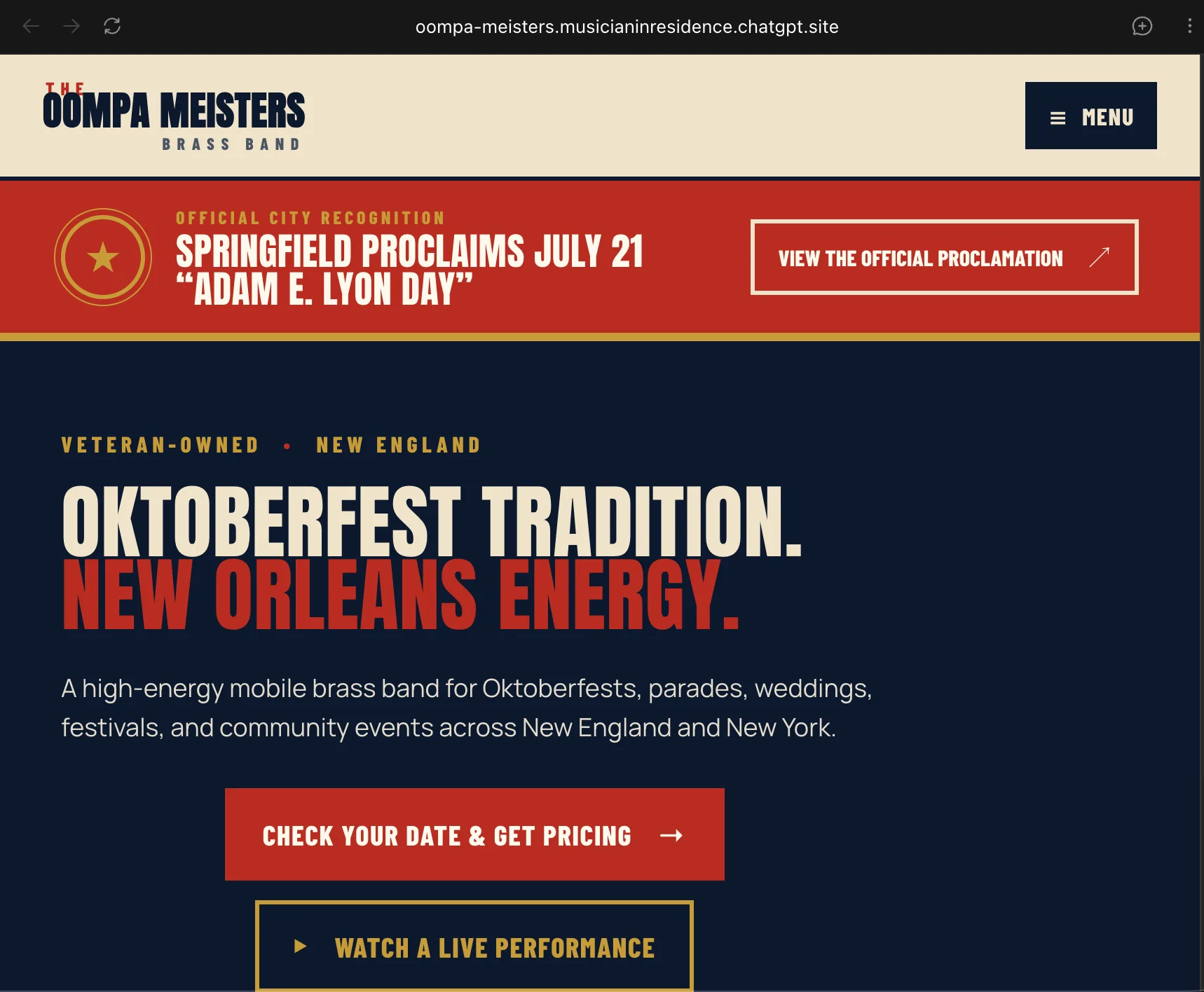
What the Oompa site gets right
- • Eleven distinct public pages and a linked PDF returned successfully
- • Real band photography, testimonials, local service areas, and contact details
- • Descriptive page titles, canonical URLs, robots.txt, and an XML sitemap
- • A live custom domain that receives the canonical SEO signals
- • Skip links, semantic navigation, useful alt text, and a noindex musician portal
The to-do list it still left
- • Make event cards useful with venue, ticket, map, and add-to-calendar links
- • Remove past dates from Upcoming Shows or mark them as completed
- • Replace the private Google Form that blocks public booking with a 401 response
- • Add Privacy and Terms pages before loading analytics or collecting portal credentials
- • Replace the predictable phone-number PIN rule with proper authentication
- • Add MusicGroup, Organization, Event, and BreadcrumbList data, then test every action by outcome
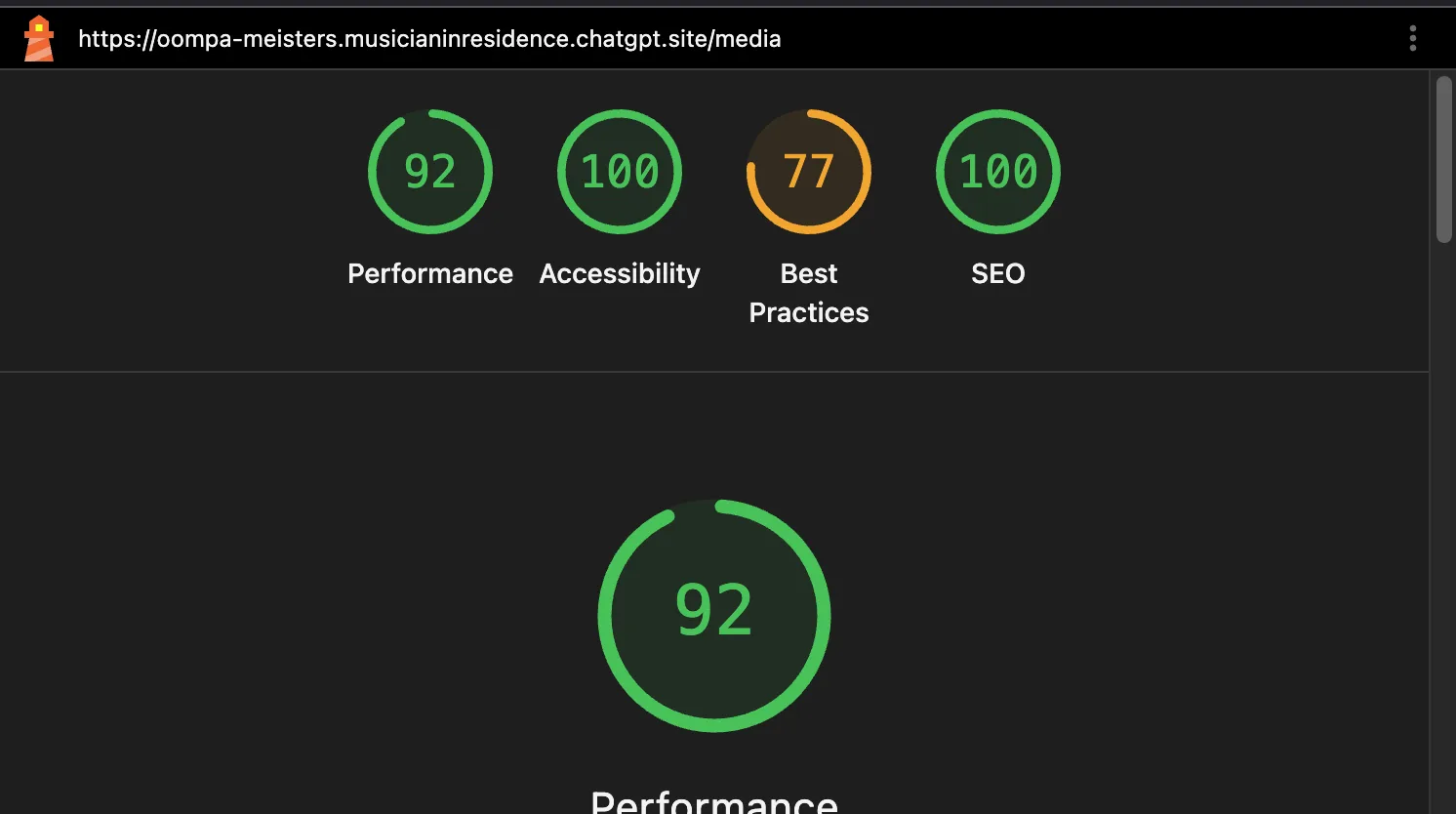
I checked the links instead of trusting the score. Eleven public routes returned distinct HTML pages, and the proclamation PDF returned successfully. The main navigation is not fake. The interaction gap sits one level deeper.
The Upcoming Shows cards contain dates, locations, and times but no links for tickets, venue details, directions, or adding an event to a calendar. On the day of this audit, the August 20 and August 22 events were still presented as upcoming. The media page's “Open the YouTube channel” link opens one video rather than the named channel. These elements display information without finishing the visitor's likely task, which makes parts of the site feel like they do nothing.
The booking path does not work for the public. Every booking button I checked points to the same private Google Form. Following that exact link returned an HTTP 401 response and a Google sign-in page. A visitor cannot ask for pricing or check a date through the site's main conversion path.
Privacy and Terms routes returned 404 even though Google Analytics loads and the musician portal asks for an email address and PIN. More seriously, the login screen tells musicians to use the first six digits of their phone number as that PIN. I did not submit the private form, but that published credential rule is predictable and should be replaced with proper authentication before launch.
The Lighthouse scores still deserve credit. The pages have descriptive titles, useful metadata, canonical tags, a crawler file, a sitemap, skip navigation, sensible landmarks, and good alt text. I found no JSON-LD on either the canonical home page or events page. The site has no structured entity for the band and no Event objects for its public performances.
JSON-LD is not required for ordinary indexing. It is the clearest way to tell search engines that this is a MusicGroup or Organization and to describe each show with a name, date, status, venue, address, performer, image, URL, and ticket offer when one exists. Internal pages would also benefit from BreadcrumbList. The visible page must support every field. Markup cannot manufacture missing venue or ticket details.
Adding JSON-LD to the current schedule page would not finish the job. Google's event guidance says each event needs a unique leaf URL with its structured data on that page. The Oompa site has one list of static cards. We would give each public show a useful page, connect it to tickets, directions, and the venue, then add accurate Event markup there.
That makes the 100 SEO score narrower than it looks. It means the tested page passed Lighthouse's SEO checks. It does not mean the site has the structured data needed for event eligibility, a complete local search plan, working conversion paths, or fresh listings.
This is exactly where Internet Crafters earns its keep. A production review asks whether a customer can complete the job, whether old information is retired, whether private access is actually private, whether analytics has a policy, and whether the owner knows what to update next month. Generating twelve polished routes is impressive. Taking responsibility for the whole system is the website work.
Can You Update a ChatGPT Site, and What Happens If You Stop Paying?
ChatGPT Sites supports later edits, saved versions, and redeployment. OpenAI says Sites is available on qualifying paid plans, but its current documentation does not promise what happens to a public site after cancellation or downgrade. That unanswered hosting question matters before a business depends on the URL.
Updates are possible. Open the Site, choose Edit, describe the change, save a new version, and deploy it. OpenAI says a Site remains in the Sites list after its original chat ends. Local projects can also associate a saved version with a Git commit, which gives a developer something concrete to review or move.
Cancellation is less clear. The official documentation says Sites is available with Plus, Pro, Business, Enterprise, and Edu plans. It also says hitting a usage limit can stop a high-usage Site from remaining public while still allowing the owner to edit and manage existing Sites. That is a usage-limit rule, not a promise about cancelling the paid plan.
I could not find an official commitment that a public URL stays online forever after downgrade, or a stated grace period and export deadline. OpenAI may clarify that during the beta. Until then, a business should treat continued hosting as dependent on platform rules it does not control.
This is not a reason to dismiss Sites. It is a reason to use it for a prototype, private tool, campaign experiment, or lightweight app where the risk matches the dependency. Roadnote is a strong result for a new technology. It is still closer to an impressive software toy than a complete company website.
Prototype the idea
Find out whether people understand the product before spending weeks on it. Roadnote is this kind of win.
Make an internal tool
A tracker, form, dashboard, or small workflow may not need a public search strategy.
Run a short campaign
A one-job page can favor speed when its known audience receives the link directly.
Bring the draft to a developer
A developer can keep useful code, correct the claims, and finish the public-facing work.
I would use Sites again for this kind of experiment. Thirty minutes bought a working answer and exposed the decisions that mattered next. That is a much better use of AI than asking it for fifty pages of filler and hoping Google mistakes volume for authority.
If an AI builder gave your business one attractive screen, keep the useful parts. Do not confuse that draft with the website customers need to trust you, understand the offer, find you in search, and make contact. Internet Crafters handles that second job. Our breakdown of what AI website builders actually cost covers the arithmetic.
A Working Screen Is Not Your Website.
Bring us the business, not a perfect prompt. Internet Crafters plans the pages, connects the navigation, chooses licensed visuals, writes for customers, builds in basic SEO, tests the phone experience, and hands you code you own.
$550 for five to seven pages. Two revision rounds. A 30-day money-back guarantee. No required monthly service plan from us.
Written by Steve Bullis
Steve Bullis is the founder of Internet Crafters, a Tucson web studio building flat-rate websites for local businesses.
Sources
OpenAI Docs - Sites
learn.chatgpt.com
Roadnote - Deployed ChatGPT Site reviewed for this article
roadnote-voice-notes.swbullis.chatgpt.site
MDN - SpeechRecognition
developer.mozilla.org
MDN - Window.localStorage
developer.mozilla.org
Google Search Central - JavaScript SEO basics
developers.google.com
Google Search Central - Creating helpful, reliable, people-first content
developers.google.com
Google Search Central - How to specify a canonical URL
developers.google.com
Google Search Central - Image SEO best practices
developers.google.com
Google Search Central - Software app structured data
developers.google.com
Google Search Central - Event structured data
developers.google.com
Google Search Central - Organization structured data
developers.google.com
Google Search Central - Breadcrumb structured data
developers.google.com
W3C - Understanding Resize Text
w3.org
Cloudflare - Cloudflare cookies
developers.cloudflare.com
MDN - Content Security Policy
developer.mozilla.org
The Oompa Meisters - Unaffiliated ChatGPT Site audited for this article
oompa-meisters.musicianinresidence.chatgpt.site
Sources checked August 29, 2026. Roadnote and Oompa Meisters implementation details come from their deployed public HTML, JavaScript, headers, and linked files. The Oompa Lighthouse capture was supplied for this article.